Table Talk for Apple TV puts the table on the big screen. In the room, it's the board everyone watches: the cards, the pot and whose turn it is. Over video, it's every face around the felt. Your cards and your buttons stay on your phone.
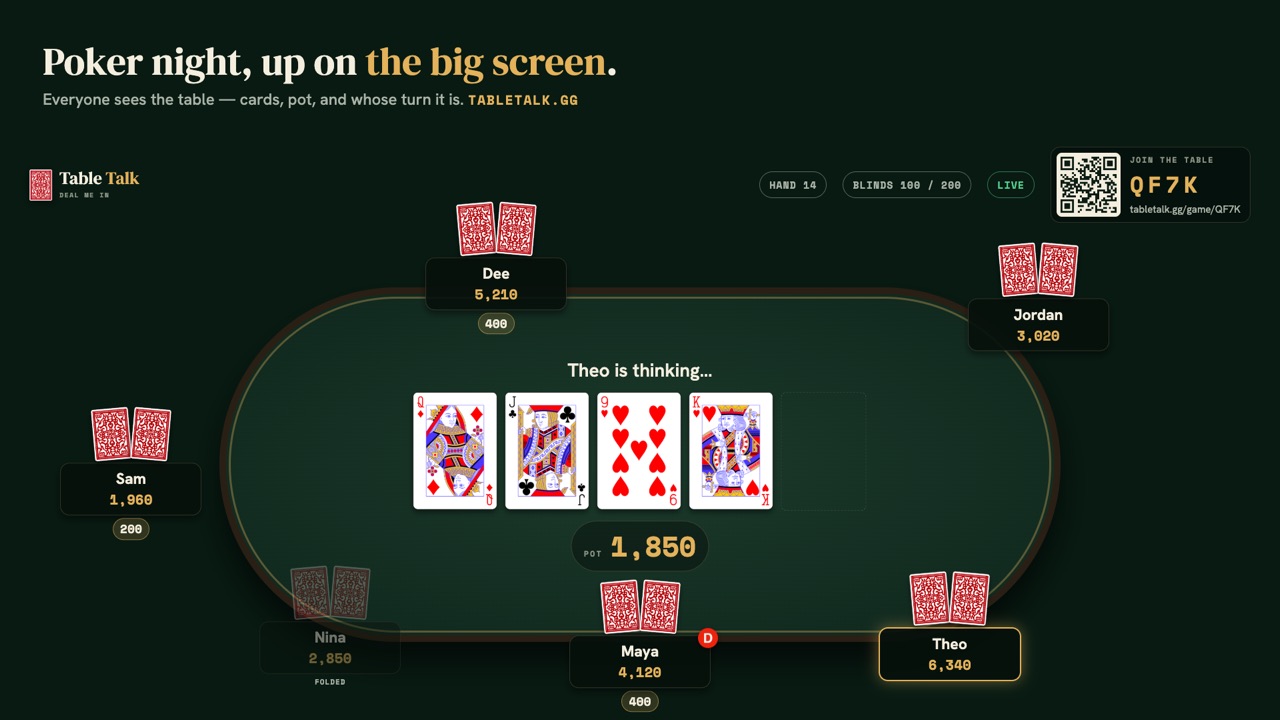
The board in the Apple TV app, with the join code in the corner.
How it works
Get the appOn your Apple TV, search the App Store for “Table Talk”. It's free, with no purchases.
Open itThe TV shows a QR code and a 4-digit pairing code.
Scan to pairScan the QR with your phone: table setup opens with the TV attached, and starting the table pairs it. Already hosting? In your game tap ⋯ → 📺 → Pair TV and type the code.
DealFriends scan the QR on the TV to sit down. Everyone plays from their phone; the TV shows the table.
What the TV shows
The board, the pot and the stakes.
Every seat, stack and bet, with a clear highlight on whose turn it is.
The showdown, with the winning hand called out, and a receipt for each pot.
Final standings when the night is done.
On a dealer's choice night, who called which game, announced as each hand starts.
Your hole cards never go to the TV. It only shows what the whole table can see, and each player's hand stays on their own phone.
In the room, or over video
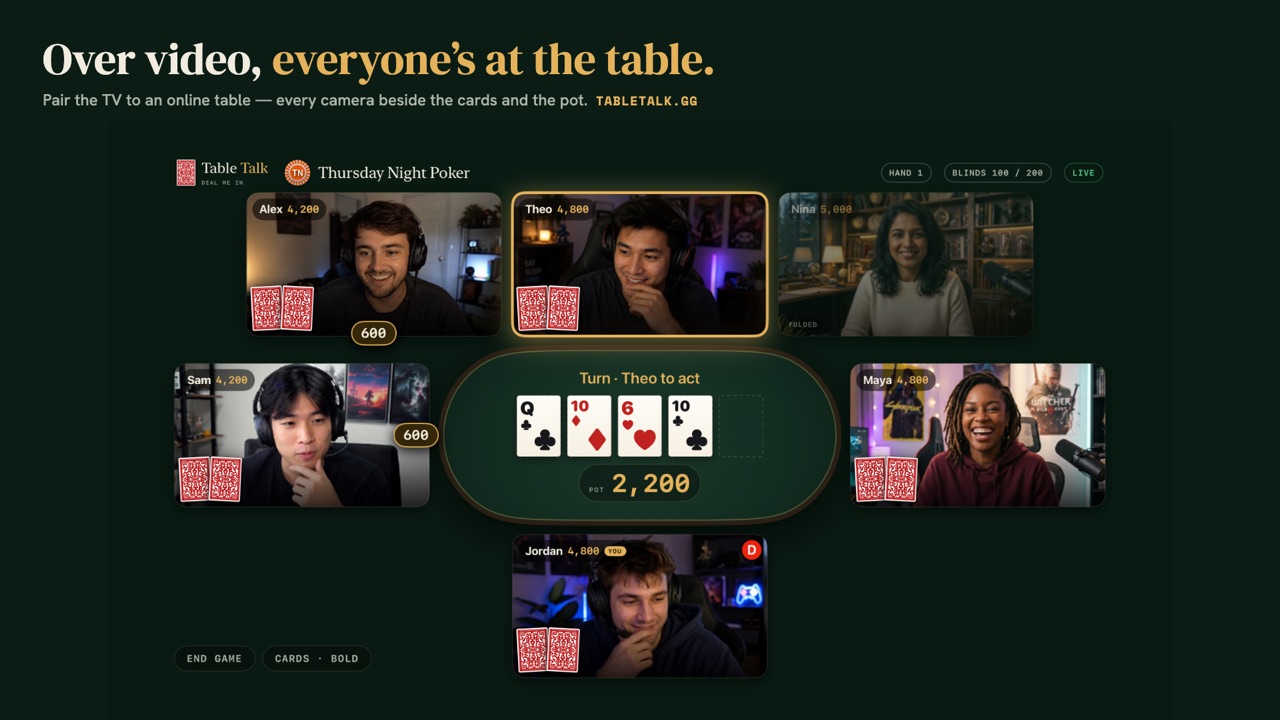
At an in-person table, the Apple TV is the board everybody watches while they play from their phones. Paired to an online video table, it shows everyone's camera around the felt with the cards and the pot. Your phone stays your camera, microphone, cards and buttons, and the sound stays on your phone too, so its echo cancellation keeps working.
No Apple TV?
You don't need one. The board is a web page that runs on any screen with a browser: a smart TV, a laptop on HDMI, or a tablet. The app is for the TVs where a browser isn't an option.
Free, with nothing to buy
The Apple TV app is free and has no purchases. It's a companion to games hosted at tabletalk.gg, so starting a game needs a Table Talk account, made on the web. It's on the App Store in the United States and Canada.
Paired to a video table, the TV shows everyone's camera around the cards and the pot.
What it costs
In person: free forever · Online: first night free
In-person games never cost a thing — tip your dealer if the night earned it.
Online video nights run on credits: one credit opens one table, and everyone you invite plays free.
The One-Nighter$2.991 online game credit · $2.99 a night
The Regular$19.9910 online game credits · just $2.00 a night
The Host$39.9925 online game credits · just $1.60 a night
The Club$7.99 / month, for the whole groupRecurring game nights with SMS reminders and one-tap RSVPs, date polls, calendar feeds, season stats, and two video nights a month included — no credits.
Every group starts free: make it, invite the crew, schedule the next night with RSVPs and reminders by email or push, play in person as often as you like, and see the last 30 days of the leaderboard. The Club adds the rest.
Credits are a fee to host an online game; in-person tables are free with an optional tip jar; the Club plan is a fee to run a group. None of it carries pot value or can be cashed out.
Common questions
Is there a poker app for Apple TV?
Yes. Table Talk: Poker night is a free Apple TV app that shows your Table Talk game on the TV. The games are hosted at tabletalk.gg.
Does the Apple TV app cost anything?
No. The app is free and has nothing to buy. In-person tables are free too; online video tables are hosted on the web.
Can people see my cards on the TV?
No. The TV only ever shows what the whole table can see. Your cards stay on your phone until the showdown.
Does it work for online video games?
Yes. Pair the TV to a video table and everyone's camera goes up on the big screen with the cards and the pot. Sound stays on your phone, so its echo cancellation keeps working.
Do I need an Apple TV?
No. The board works in any web browser — a smart TV, a laptop on HDMI or a tablet. The Apple TV app is for TVs without a usable browser.
Where is the app available?
On the App Store in the United States and Canada.
Deal me in
Practise against three bots in your browser right now, or open a table and text your people the link.